Chrome Extension

How to Use
Wayground Hacker

The ultimate power-user toolkit for Wayground.com. Unlock all features, activate speed boost, and take full control of your experience.

Wayground Hacker — Extension banner with cyberpunk-style logo

What Can It Do?

Wayground Hacker enhances your Wayground.com experience with a sleek hacker dashboard and powerful automation tools.

🎛️

Mod Menu

Toggle the built-in Mod Menu to access all available mods from a single, clean interface on any Wayground page.

🔓

Unlock All

Instantly unlock all available features and resources on Wayground.com with a single click — no extra steps needed.

Speed Boost

Accelerate game interactions and page load performance with the built-in speed boost feature for a smoother experience.

How to Get Started

Follow these simple steps to install and start using Wayground Hacker on your Chrome browser.

01

Install the Extension

Download and install Wayground Hacker from the Chrome Web Store. Click Add to Chrome and confirm the installation when prompted. The extension icon will appear in your browser toolbar.

02

Navigate to Wayground.com

Open a new tab and go to wayground.com. The extension activates automatically when it detects you're on the Wayground platform. You'll see the extension badge turn green indicating it's active.

03

Open the Hacker Dashboard

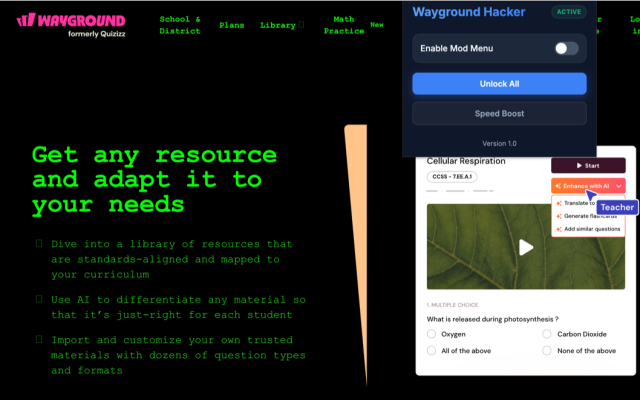
Click on the Wayground Hacker icon in your toolbar to open the popup dashboard. You'll see the dark-themed control panel with all available options including the Enable Mod Menu toggle, Unlock All, and Speed Boost buttons.

04

Enable the Mod Menu

Toggle the Enable Mod Menu switch to ON. This will activate the floating mod menu overlay on the Wayground page, giving you quick access to every available mod without needing to open the popup again.

05

Activate Features

Use the Unlock All button to instantly gain access to all platform features. Hit Speed Boost to enable accelerated interactions. Each feature can be toggled independently — simply click the corresponding button to turn it on or off.

Extension Interface

Wayground Hacker extension popup showing the mod menu, unlock all, and speed boost features on Wayground.com

The Wayground Hacker dashboard activated on wayground.com — Access all mods from one place.

💡
Pro Tip: Keep the Mod Menu enabled for the best experience. It floats on top of the page so you can quickly toggle features without opening the extension popup every time. The dashboard remembers your preferences between sessions.

FAQ

Does the extension work on other websites?
Wayground Hacker is designed exclusively for wayground.com. It will not activate or affect any other websites you visit.
Is the extension safe to use?
Yes. Wayground Hacker runs locally in your browser. It does not collect personal data and all features operate on the client side without sending information to external servers.
Can I use Unlock All and Speed Boost at the same time?
Absolutely! All features are independent and can be activated simultaneously. Feel free to enable any combination of mods to customize your experience.
The extension icon is grayed out — what should I do?
A grayed-out icon means you are not on wayground.com. Navigate to the Wayground website, and the icon will become active automatically. If it remains inactive, try refreshing the page or reinstalling the extension.